WhatsApp Business Platform and WhatsApp Coexistence – One Number Two Doors
Coexistence is Meta's answer to that dilemma. It is also one of the most misunderstood terms in business messaging, because people treat it as a rival to the Platform when it is closer to a bridge. This article untangles the three things that get confused, the Business app, the Business Platform, and Coexistence, and explains what you actually gain and give up by choosing each.
For years, a business that outgrew the WhatsApp Business app faced a cruel choice. To plug WhatsApp into a chatbot, a customer database, or a shared team inbox, it had to move its number to the WhatsApp Business Platform, the API side of the house. Doing that switched the number off in the app. The phone that had handled customer chats for years went quiet, the familiar interface vanished, and the conversation history stayed behind. You could have the app or the API, but not both.
Coexistence is Meta’s answer to that dilemma. It is also one of the most misunderstood terms in business messaging, because people treat it as a rival to the Platform when it is closer to a bridge. This article untangles the three things that get confused, the Business app, the Business Platform, and Coexistence, and explains what you actually gain and give up by choosing each.
Quote
Coexistence is not a third product. It is a way of standing in two doorways at once.
Three Names, Two Products, One Number
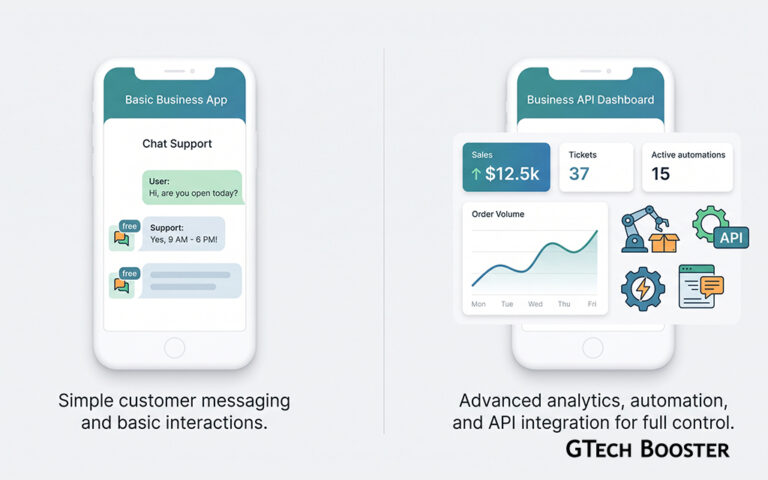
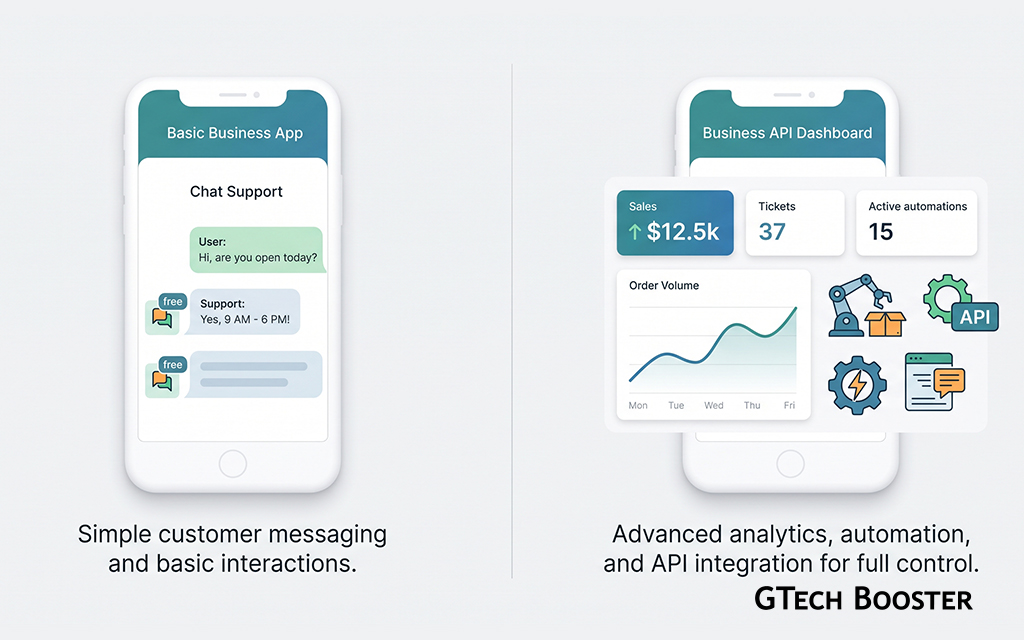
Start with a clean vocabulary, because most of the confusion lives here. The WhatsApp Business app is the free app installed on a phone. A person types replies by hand, and it suits a small team answering customers one chat at a time. The WhatsApp Business Platform, which includes the Cloud API, is Meta’s infrastructure for businesses that want software to talk to WhatsApp. It is built for automation, integrations, large volumes, and many agents working from a shared system. Coexistence is neither of those. It is a mode in which a single phone number is attached to both at the same time.
So the useful question is not “Platform or Coexistence.” It is “Do I want the API, and if so, do I need to keep my app?” Coexistence only becomes relevant when the answer to the second part is yes.
The Business App in Brief
The Business app is free, simple, and personal in scale. One phone is the center of it, with up to four linked devices such as a laptop. It offers a business profile, a catalogue, labels, quick replies, greeting and away messages, and broadcast lists of up to 256 saved contacts. A person is behind every message.
What it lacks is plumbing. There are no webhooks, no direct connection to a customer database, and no way for software to send an order confirmation the moment a purchase happens. Its strength is also its limit, because everything depends on people and a phone.
The Business Platform in Brief
The Platform is the engine room. Businesses usually reach it through a Business Solution Provider, a company that wraps Meta’s API in a dashboard, an inbox, and integrations. Messages flow through software, so any number of agents can work from one inbox, chatbots can answer instantly, and systems can trigger messages automatically.
It also operates under stricter rules. A business can start a conversation only with a pre-approved template message. Once the customer replies, a 24-hour customer service window opens, in which free-form messages are allowed. And it is billed per message, with rates that depend on the category and the recipient’s country. Meta changed that model again on 1 October 2026, so that service replies and utility messages sent within the 24-hour window are now chargeable too, according to the provider guides published ahead of the change.
That is the Platform’s trade. You get scale and automation, and you pay for them in complexity and per-message costs.
The Migration Cliff Coexistence Was Built to Remove
Under the old arrangement, adopting the API meant a hard cut. The number left the app, the staff lost their familiar tools, and the business started with an empty history in a new system. For a small shop whose entire customer relationship lived on one phone, that was a heavy price just to add an automated order confirmation.
Coexistence, which Meta introduced in beta in early 2025 and has since rolled out widely, lets the number stay in the app while also being connected to the Platform. Staff keep chatting from the phone. Software can send and receive through the API on the same number, and both sides see the same conversation.
How Coexistence Works
The setup is closer to linking a device than to a migration. A business works with a Meta-approved provider, selects its WhatsApp Business Account, and enters the number it already uses in the app. Meta then displays a QR code, which the business scans from the app’s Linked Devices screen, and the app confirms that it is now connected to the Business Platform.
After that, messages are mirrored. Replies typed in the app appear to the API side as echoes, and messages sent through the API appear in the app. With the owner’s consent, up to 180 days of one-to-one chat history and the contacts list are copied across, in a one-time sync that should complete within 24 hours.
What Is Required
Several conditions apply, and sources agree on most of them. The app must be a recent version, with 2.24.17 or later cited by multiple providers. The number must be registered in the Business app and must not already be connected to the Platform. The account needs enough history to be eligible, so a brand new app account may not qualify. The business must onboard through a provider, not a self-serve button. And the two-step verification PIN should be turned off beforehand, according to one provider’s checklist.
What You Gain and What You Give Up
Coexistence is a bargain, and bargains have terms. The table below compares the three setups based on the provider documentation I reviewed. Figures such as throughput can differ between sources and over time, so confirm them with your provider.
| Aspect | Business app only | Platform (API) only | Coexistence |
|---|---|---|---|
| Best for | A small team replying by hand | Automation, CRM links, high volume | Keeping the app while adding the API |
| Cost of messages | App messages free | Per message by category and country | App messages free, API messages billed |
| People and devices | One phone and up to four linked devices | Any number of agents through software | Phone and up to four devices, plus API access |
| Bulk messaging | Broadcast lists up to 256 contacts | Templates through the API | Broadcast lists become read-only, campaigns use the API |
| Automation | Greeting, away, and quick replies | Chatbots, AI agents, integrations | API automation, manual replies in the app |
| Throughput | Not published | 80 messages per second, up to 1,000 for eligible numbers | Capped at 20 per second, combined |
| Verified badge | Paid Meta Verified subscription | Official Business Account where eligible | Official Business Account not supported |
The Features That Switch Off
Some app features are disabled for individual chats once Coexistence is on. Disappearing messages, view-once media, and live location stop working. Broadcast lists remain visible but you cannot send through them. Group chats stay usable in the app but are not synced to the API, and calls, catalogues, and labels stay on the app side. Onboarding also unlinks any existing companion devices, and WhatsApp for Windows and Wear OS are not supported as companions, although up to four other devices can be linked again.
The Upkeep You Inherit
There is also a maintenance rule. The Business app must be opened regularly, roughly every two weeks, or the connection can drop. Sources disagree on whether the limit is 13 or 14 days, so treat it as a fortnightly habit. A shop that leaves its phone in a drawer, or whose staff leave the app uninstalled, will quietly lose the setup.
The Money Question
Cost is where Coexistence becomes strategically interesting, and where careful reading pays off. According to provider documentation, messages sent from the Business app are free, and messages sent through the API are billed at Meta’s Cloud API rates. With the October 2026 change, a business replying through the API now pays for those replies, whereas the same reply typed into the app does not appear to carry a Meta charge.
Quote
Under Coexistence, where a reply is typed can decide whether it costs money.
That is an inference from the pricing statements, not a promise from Meta, so confirm it against Meta’s current rate card. But it explains why some businesses now treat Coexistence as a cost-control tool as well as a convenience. Routine human conversations can stay in the app, while templates, notifications, and automations run through the API.
One subtlety matters. A provider notes that messages sent from the app do not open or extend the API’s 24-hour customer service window. So a conversation that only ever happens by hand in the app does not give the API side permission to send free-form messages later.
Who Should Choose What
The right answer depends on how your business actually behaves. Stay with the Business app if one or two people can handle all chats and customers mostly start the conversation. You do not need an API, and adding one would add cost and upkeep without payoff.
Choose Coexistence if you have an established number and customer history in the app, your team likes working from the phone, and you want to add selected automation such as order confirmations, shipping updates, or reminders on the same number. Keep in mind the 20 messages per second cap, the loss of the Official Business Account badge, and the fortnightly app check.
Move fully to the Platform if you need high volume, many agents in a shared inbox, advanced chatbots, an Official Business Account, or the highest throughput. You give up the app and its history, but you gain the full toolset.
Before You Start
A short checklist saves frustration. Update the Business app to a current version. Confirm that your number is not already attached to another provider, which can block onboarding. Decide whether you want the history to sync, since that choice is made during onboarding. Tell your staff which features will change, especially if they rely on broadcast lists or disappearing messages. And ask your provider whether Coexistence is available in your country, because the sources I reviewed are inconsistent about the status of specific African markets, and Ghana is not named on the pages I checked.
Wrapping it up
The Business Platform and Coexistence are not opponents. The Platform is the machinery that lets software talk to WhatsApp at scale. Coexistence is the arrangement that lets a number already living in the Business app borrow that machinery without being evicted from its home. The Platform alone is the power option, the app alone is the simple option, and Coexistence is the compromise that trades some features and a lower speed ceiling for continuity.
The real decision is not a technical one. It is a question of where your customer relationships live today, and how much of that you are willing to move. If the answer is “on a phone, in conversations we still want to have by hand,” then Coexistence is the least disruptive way to add software to that relationship.
More Information ℹ











Conversation
Login to comment.
Log In / Register