USSD Codes Structure – How to Read Codes Like *123# and 1231#
The code you dial is the first message in that session. Its structure tells the network which service you want and, in some cases, gives that service the details it needs.
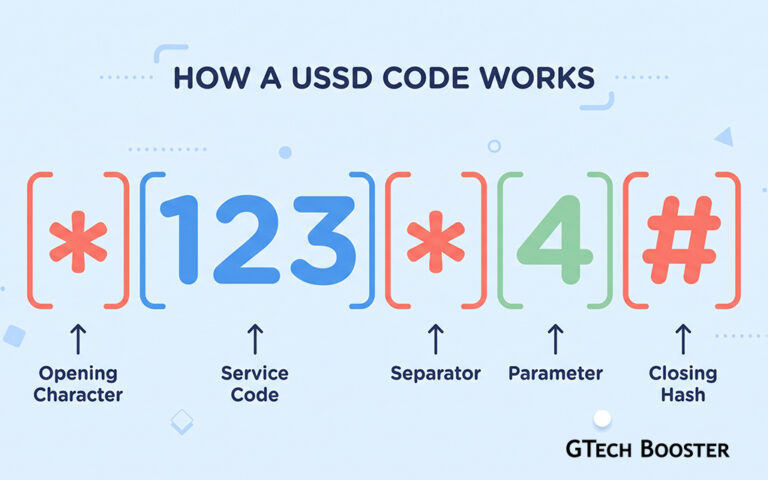
Most people use USSD codes by copying them from an advert or a text message and pressing the call button. They rarely ask why the code looks the way it does. Why the asterisks? Why the hash? What is the difference between *123# and 1231#? Once you understand the structure, codes stop looking like random strings, and you can read them, spot mistakes, and recognize suspicious ones. This article breaks a USSD code into its parts, explains the official format behind it, and shows how everyday codes are built on top of it.
A Quick Reminder of What a USSD Code Does
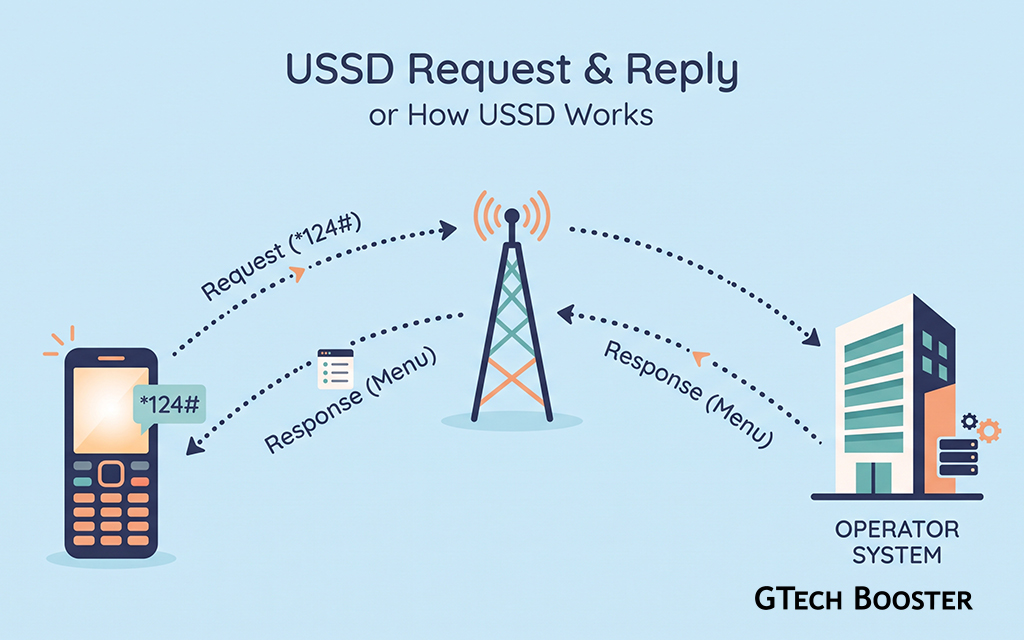
USSD stands for Unstructured Supplementary Service Data. When you dial a code, your phone does not place a voice call. It sends the string you typed over the mobile network’s signaling channel to a system run by your operator, which answers with a short text, usually a menu. You reply with numbers, and the exchange continues as a live session until the task is done or the session closes. No internet connection or smartphone is needed, which is why USSD remains popular for balance checks, data bundles, and mobile money.
The code you dial is the first message in that session. Its structure tells the network which service you want and, in some cases, gives that service the details it needs.
The Anatomy of a USSD Code
Nearly every code is built from the same few pieces. Looking at them one at a time makes the whole string easier to read.
The Opening Character
A USSD code begins with an asterisk (*) or a hash (#). Most everyday codes begin with a single asterisk, as in *123#. The opening character tells the phone that what follows is a command for the network, not a phone number to be dialed as a voice call.
The Service Code
Right after the opening character comes the service code, the digits that identify what you want. In *123#, the digits 123 are the service code. In the official standard for call related services, service codes are short two or three digit numbers, such as 21 for call forwarding. Operators also create their own service codes for their own menus, balance checks, and bundles. The network reads this number and routes your request to the matching service.
The Separators
An asterisk placed between groups of digits separates one piece of information from the next. In 1231#, the 123 identifies the service and the 1 is extra information that takes you directly to the first option. The asterisk works like a comma in a list.
The Parameters
After the service code and separators, a code may carry parameters, which are the details a service needs. This could be a phone number, an amount, a bundle selection, or a PIN. A code such as 1231020123456710# is made of the service code 123 followed by three separate values. Whether such a code is valid depends entirely on how the operator designed that service. That example is made up for illustration and should not be dialed.
The Terminating Hash
Almost every code ends with a hash (#). It signals that you have finished typing, so the phone knows to send the string. Forgetting it is one of the most common reasons a code fails or the phone treats it as a normal call.
Pressing Call
After typing the full string, you press the call or send button. The phone recognizes the pattern, does not set up a voice call, and starts a USSD session. A reply appears on the screen within a few seconds.
The Official Format Behind the Pattern
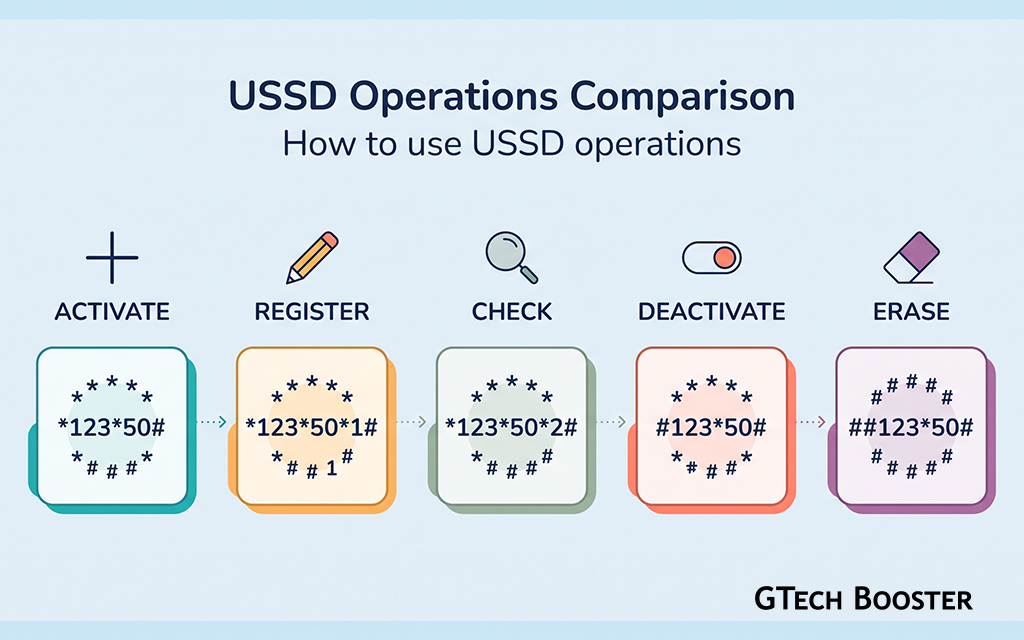
Behind the everyday look of codes sits a standard written by the 3GPP, the body that defines GSM and later mobile technologies. Its specification for the phone’s man machine interface (TS 22.030) describes a general format often written as SCSI#. SC stands for the service code, and SI stands for the supplementary information the service needs. The standard also defines how the opening and closing characters change the meaning of the same service code.
The table below shows the five basic forms, using call forwarding on all calls (service code 21) as the example.
| Form | Meaning | Example |
|---|---|---|
| SCSI# | Activate or use the service | 21number# |
| **SC*SI# | Register the service with details | **21*number# |
| *#SC# | Interrogate, meaning check the current status | *#21# |
| #SC# | Deactivate the service | #21# |
| ##SC# | Erase the registration | ##21# |
The point is that the leading characters carry meaning. A single asterisk, a double asterisk, an asterisk followed by a hash, and a hash on its own all change what the network does with the same service code. Different phones and networks may treat some of these forms slightly differently, so the table describes the standard pattern, not a guarantee for every handset.
Codes Handled by the Phone Itself
Some codes never reach the network at all. The best known is *#06#, which makes your phone display its IMEI, the unique serial number of the device. The phone recognizes this string and answers locally. Many dialer codes that open engineering menus or settings screens work the same way, and these differ by phone make.
Everyday Shortcodes Like *123#
Operators build their own services on the same grammar. The simplest case is a shortcode, a short code that opens a main menu, such as *123#. The digits are chosen by the operator, which is why the same service uses different codes on different networks. The same number can mean different things in different countries or on different operators, so always confirm a code from your operator’s official channels.
Menus and Direct Shortcuts
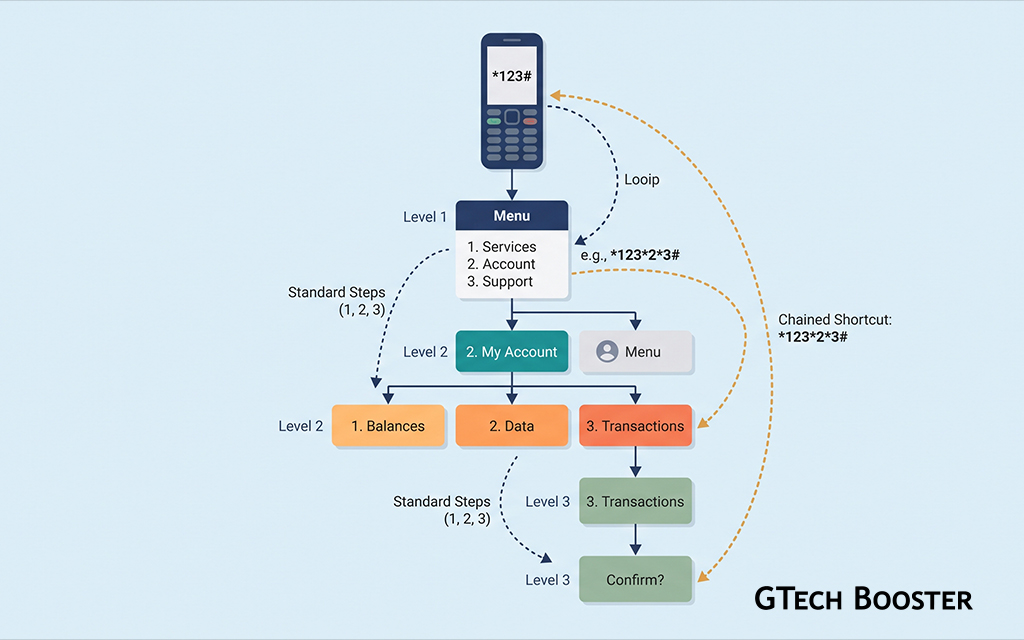
When you dial 123# you land on a menu, and you then reply with 1, 2, or 3 to move through options. Experienced users learn that they can skip menus by chaining choices with asterisks. If option 1 on the main menu is “Buy bundle” and option 2 inside it is “Daily data,” then a code like 12312# may reach the same screen in one step. Such chains are designed by the operator, so they work only on the codes the operator publishes.
Codes That Carry Data
Some codes carry data inside the string. In mobile money systems, a code may take a recipient number and an amount. Typing the data into the code can be quicker than navigating menus, but it also means a typing error can send a request with the wrong details. When a code asks for a PIN, use it only on codes you have confirmed with your provider, and prefer entering a PIN on a menu screen rather than inside a string someone gave you.
What About Codes Like 1231#
You will sometimes see codes that do not start with an asterisk, such as 1231#. These strings end with a hash but have no opening asterisk. In practice, many phones send a string ending with a hash to the network as a USSD request, and the operator’s system decides whether it recognizes it. I could not confirm from the sources I checked how every handset classifies such strings under the standard, so behavior can vary by phone and network.
The practical advice is to type a code exactly as your operator publishes it, including any opening character and the final hash. If a code without an asterisk does not work, try it with an asterisk, or check your operator’s website for the exact form.
Inside a Session: Codes Versus Replies
The structure changes once a session starts. The first string you dialed is a code. Every number you type afterward is a reply within that session, and the system interprets it based on the menu currently on your screen. Typing a new code in the middle of a session can confuse the system, so end or cancel the session first.
USSD messages are short. The standard allows up to about 182 characters of text in a single message, which is why menus are brief and sometimes split across several screens. Sessions also expire if you wait too long, and the exact time depends on the operator. If a session times out, dial the code again from the beginning.
Codes That Deserve Extra Caution
Because the leading characters carry meaning, a harmless looking string can change how your phone behaves. Codes beginning with ** followed by a number such as 21, 61, 62, or 67 register call forwarding. A fraudster who persuades you to dial one can divert your incoming calls and verification codes to their own number. This is a pattern worth knowing about, not a recipe.
Never dial a code that a stranger dictates to you, that arrives in an unexpected message, or that promises a prize, a refund, or “verification.” Before dialing something you do not recognize, ask your operator what it does. You can check whether forwarding is active with the interrogation form *#21#, and you can cancel it with ##21# or through your operator.
Common Mistakes and How to Avoid Them
Most failures come from small errors. Leaving out the closing hash is the most frequent one. Adding spaces or extra characters inside the string, particularly when copying from a message, can break a code. Dialing from a phone with two SIM cards may send the request through the wrong SIM, so choose the right line. Being in a poor coverage area can cause a connection error, in which case try again when the signal improves. And remember that the same code on a different operator may do something different or nothing at all.
Bringing It All Together
A USSD code is a short instruction made of an opening character, a service code, optional separators and parameters, and a closing hash. The official format SCSI# gives each part a role, and the choice of asterisks and hashes at the start changes whether you are using, registering, checking, or cancelling a service. Everyday codes like *123# are operator built shortcuts on top of that grammar, with chained choices such as 1231# acting as direct routes into menus. Codes without an opening asterisk, like 1231#, are often still sent as USSD but can behave differently from one phone or network to another, so follow your operator’s exact instructions.
Once you can read the pieces, you can type codes accurately, navigate menus faster, and recognize strings that deserve suspicion before you press call.
More Information ℹ
- Understanding USSD – What It Is and How It Differs from SMS and Voice Calls
- The History and Role of USSD in Mobile Telecom – A 2G Legacy Technology Still Widely Used







Conversation
Login to comment.
Log In / Register