The Bloatware Problem – How Preinstalled Apps Are Quietly Undermining Smartphone Security
Bloatware exists because it is profitable, and understanding that incentive explains why the trend keeps getting worse rather than better. Endangering users, their personal data and sinking nations.
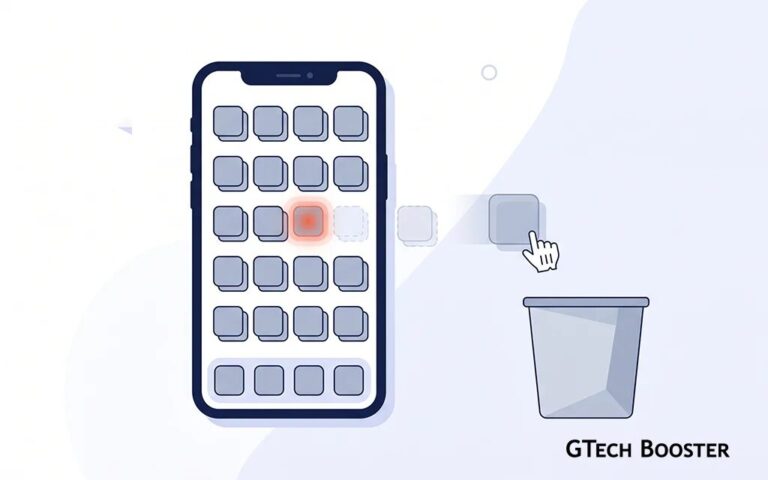
Open the app drawer on almost any smartphone bought fresh out of the box today, whether it runs Android or, to a lesser extent, iOS, and you will find a long list of apps you never asked for. A second web browser competing with the one you already use. A “game center” you will never open. A carrier-branded app promising deals you did not sign up for. A “device care” utility duplicating something the operating system already does. This is bloatware, and while it has existed in some form since the earliest days of the smartphone, the trend has grown into something far more serious than wasted storage space. It has become a genuine security and privacy liability, and the way manufacturers handle these apps over a device’s lifetime makes the problem worse with every passing year, not better.
This article looks closely at how bloatware has evolved, why apps that start out useful often turn into something far more invasive over time, and why the system Android and manufacturers use to “remove” bloatware does not actually remove it at all, leaving users far more exposed than they realize.
What Bloatware Actually Is
Bloatware refers to any software preinstalled on a device by the manufacturer, the carrier, or a third party paying for placement, that the user did not choose to install and often cannot fully remove. It typically falls into a few categories:
- Manufacturer utilities.
Apps built by the phone maker itself, such as a proprietary app store, a health tracker, a backup tool, or a customized version of a core function like the phone dialer or gallery. - Carrier apps.
Software installed at the request of the mobile network operator, often promoting the carrier’s own services, streaming bundles, or account management tools. - Third party placement deals.
Apps installed because a company paid the manufacturer or carrier to guarantee its icon appears on millions of devices at first boot. This has included social media apps, games, shopping apps, and financial apps that have nothing to do with the core function of the phone. - Duplicate system functions.
A manufacturer skin’s own version of a messaging app, browser, or file manager that runs alongside Google’s or Apple’s equivalent, effectively doubling up on permissions, background processes, and update surfaces for the same basic function.
None of this is new. What has changed is the sheer scale of it, the depth of system level access these apps are granted, and, critically, how manufacturers now use software update mechanisms to expand what these apps do long after the user has already accepted, ignored, or tried to remove them.
The Business Model Behind the Trend
Bloatware exists because it is profitable, and understanding that incentive explains why the trend keeps getting worse rather than better.
Smartphone margins, especially on budget and mid-range devices, are thin. Manufacturers and carriers have found that preinstalling apps is a reliable secondary revenue stream. Third parties pay for guaranteed placement on millions of home screens, in some cases paying per device shipped rather than per install actually used. Carriers use bundled apps to push customers toward additional subscriptions or services. Manufacturers use their own bundled apps to collect user data that feeds their advertising businesses or to lock users deeper into their ecosystem so they are less likely to switch brands later.
This is precisely why bloatware is far more aggressive on budget and mid-range devices than on flagship models, and academic research funded by the US Department of Homeland Security has confirmed this pattern directly. A large-scale study conducted by security firm Kryptowire found more than 140 critical vulnerabilities across 146 pre-installed apps from 29 different smartphone manufacturers, and noted that most of the vulnerable apps were concentrated on inexpensive devices. The uncomfortable truth is that the cheaper the phone, the more likely its manufacturer is subsidizing that low price with bloatware revenue, and the less rigorously that bloatware has been vetted for security flaws.
Why This Is Not Just an Annoyance, It Is a Security Problem
It is tempting to write bloatware off as a mild inconvenience, something that eats storage space and clutters the home screen. The research says otherwise. Because preinstalled apps are not distributed through the Google Play Store, they frequently bypass the same vetting, sandboxing, and review process that third party apps must go through. A large scale academic study covering firmware from more than 200 device vendors found that many of these preinstalled apps come with security vulnerabilities, facilitate potentially harmful behaviours, and provide backdoored access to sensitive data and services without user consent or awareness, and specifically concluded that pre-installed apps are not available on the Google Play Store and therefore often do not receive the same level of audit that ordinary downloaded apps receive.
The kinds of vulnerabilities researchers have actually found are not minor. The Kryptowire study presented at DEF CON documented preinstalled software with 47 different vulnerabilities deep inside the firmware and default apps of 25 Android handsets, flaws serious enough to allow hackers to spy on users and even remotely factory reset their devices. The same researchers had previously disclosed one of the more alarming incidents in this space: a firmware backdoor found in more than 700 million Android smartphones that silently transmitted text messages, call logs, contact lists, location history, and app data to servers in China every 72 hours.
A separate study from Stony Brook University and Universidad Carlos III de Madrid, which analyzed real world device data from nearly 2,750 volunteers covering over 1,700 phone models from 214 different manufacturers, reached a similarly blunt conclusion. It found that a significant portion of preinstalled software exhibits potentially harmful or unwanted behavior, driven by poor software engineering practices and a lack of transparency in the supply chain that unnecessarily increases users’ security and privacy risks.
What makes this categorically different from a normal malicious app problem is the removal asymmetry. As one report on the Kryptowire findings put it plainly, when third party apps downloaded by users are found to contain malware, they can at least be removed from the infected phones, but with preinstalled apps there is no such option, and there is no guarantee manufacturers will even issue a patch for older devices. A user who is careful about what they download from the Play Store, checks permissions, and avoids sketchy apps can still be fully exposed by something the manufacturer put on the device before it ever left the factory.
The Trojan Horse Pattern: Useful Today, Bloated Tomorrow
One of the more insidious aspects of the modern bloatware trend is not what ships on day one, but what a preinstalled app quietly becomes over the following months and years through routine operating system updates.
Consider a simple, genuinely useful example: an FM radio app bundled with the phone. On day one, it does exactly what it says. It tunes into local radio stations using the phone’s hardware antenna, nothing more. There is little reason for a user to be suspicious of it, and little reason to remove it, since it performs a real function some people actually want.
The problem is that this same app remains installed at the system level with elevated privileges indefinitely, and it is subject to updates the user did not request and often cannot decline individually. Over successive OS or manufacturer software updates, that same radio app can be quietly expanded to request network access it never previously needed, background location permissions it has no functional reason to use, contact list access bundled in “to enable social sharing features,” or advertising SDKs bolted on to monetize an app that was originally simple and self contained. The user who installed, or rather received, a lightweight radio utility now has a data collection tool running with system level trust, and because it was never something they chose to install from the Play Store, it never passed through the scrutiny a similarly invasive third party app would have faced before publication.
This pattern repeats across many categories of preinstalled software: file managers that add cloud upload prompts and analytics, calculator or flashlight utilities that gain ad networks, “device care” or “security” apps that expand their own permissions in order to justify their existence, and manufacturer app stores that begin pushing additional bundled software automatically. The functional core the user originally trusted stays the same on the surface, while the permission footprint and data collection underneath it grows update by update, largely invisible unless a user is actively reading changelogs and permission diffs, which almost nobody does.
This is a meaningfully different threat model from traditional malware. Traditional malware asks for trust once, at install time, and a user has a single decision point to refuse it. Bloatware that bloats gradually through updates never gives the user that clean decision point. The trust was granted once, years earlier, for a completely different and much narrower feature set, and it is never re-asked in a way that invites genuine scrutiny.
The Illusion of Removal: Why “Uninstalled” Bloatware Comes Back
Perhaps the most consequential and least understood part of this entire trend is what actually happens when a user tries to remove one of these apps.
On most Android devices, preinstalled system apps live in the device’s read only system partition. When a user goes into settings and taps “Uninstall” on one of these apps, in the majority of cases what actually happens is not a true uninstall. Instead, Android disables the app for that user profile and removes any updates that had been layered on top of it, hiding it from the app drawer and app list. The underlying application package, however, remains physically present in the system partition. As one technical breakdown of this behavior explains, the system app is restored to its base factory state because only the update layer was removed, not the app itself, which is why removed apps can appear to reinstall themselves and lead users to mistakenly believe the removal command failed.
This has a direct and serious consequence: a manufacturer OS update, a factory reset, or in many documented cases even a routine security patch, can silently restore an app a user deliberately removed months or years earlier. Users have reported this exact experience across multiple device brands and Android versions, describing bloatware and telemetry apps that reappear shortly after being deleted, with the removed system apps returning even when nothing else on the device was seemingly touched. Community troubleshooting threads confirm this is standard behavior rather than a bug limited to one manufacturer, noting plainly that manufacturer system updates can restore preinstalled apps, and that carrier or manufacturer bloatware typically gets disabled rather than permanently deleted from the system partition in the first place.
Even a full factory reset, which most users assume wipes a device back to a clean slate, does not remove this software. As explained in one detailed community answer on the subject, bloatware pre-installed apps are by default located in Android’s system partition, and a factory reset does not touch this partition at all, since a factory reset only removes user data, not the system image the apps live in. In other words, the apps a user thought they had deleted were never actually gone. They were dormant, waiting for exactly the kind of update or reset event that most users perform specifically because they believe it will produce a clean, minimal, trustworthy device.
The security implications of this are significant. A user who identified a bloatware app as invasive, made the deliberate decision to remove it, and moved on with their digital life has no reliable way of knowing that a routine software update silently reactivated it in the background, restored to whatever the newest, more permission hungry version of that app happens to be. Their personal threat model, the one they carefully built by choosing what stays on their phone, is being overwritten by the manufacturer without meaningful notice, and in most cases without a system prompt that clearly says “this application you previously removed has been reinstalled.”
Why Regular Users Have Almost No Real Defense
Genuinely fixing this problem at the user level requires root access, which the vast majority of smartphone owners will never obtain and which manufacturers actively engineer against, since rooting typically voids warranties and breaks core security features like verified boot. Community guides describe the workaround in blunt terms: the standard debloating method does not actually uninstall the package, since system apps cannot be removed completely without root access, because all system apps live on the read only system partition that only the operating system itself can write to during official updates. Even users technical enough to attempt this face real tradeoffs, since removing the wrong package can, as one guide on the subject warns, break work profiles, disable screen locks, prevent future OS updates, or cause the device to repeatedly and unstably attempt to restore critical services it thinks are missing.
For the overwhelming majority of ordinary users who simply tap “uninstall” or “disable” in their settings menu and trust that this action means what it says, the reality is that they are managing a superficial layer on top of software that remains embedded in their device indefinitely, one update away from returning uninvited.
What This Means for User Data Long Term
Put these pieces together and the picture is genuinely concerning. A user buys a phone. Preinstalled software on it may already contain unpatched vulnerabilities the manufacturer has no obligation or timeline to fix. Apps that seemed narrow and useful on day one quietly expand their permissions and data collection through routine updates the user has little practical ability to inspect or refuse. When the user notices this and takes the reasonable step of removing the offending software, that removal is frequently cosmetic rather than real, and the same software can return through the next OS update or factory reset with no clear warning that it happened.
This creates a long term security posture that degrades over the life of the device rather than improving, which runs counter to how most people intuitively think about digital hygiene. Normally, keeping software updated and periodically cleaning up unused apps is good practice that reduces risk over time. With manufacturer bloatware, the opposite can be true: staying updated can silently reintroduce risk the user had specifically already decided to eliminate.
What Can Actually Be Done
While there is no perfect fix available to the average user, a few practical steps meaningfully reduce exposure:
- Disable rather than assume deletion worked.
Treat “uninstalled” bloatware as merely dormant, and periodically check your app list after major OS updates to confirm previously removed apps have not silently returned. - Review app permissions after every major update.
Not just at install time. Manufacturer skins typically list all installed apps and their granted permissions under settings, and a changed permission set on a preinstalled app is worth investigating. - Choose devices with a cleaner software approach where possible.
Some manufacturers ship a much closer to stock experience with minimal preinstalled third party software, which meaningfully reduces the attack surface compared to heavily skinned budget devices from vendors that rely on bloatware placement fees. - Read manufacturer release notes.
Tedious as they are, since permission expansions on system apps are sometimes disclosed there even if they are not prominently flagged elsewhere. - Support and pay attention to regulatory pressure.
Several countries have begun requiring manufacturers to allow full uninstallation of non-essential preinstalled apps rather than the disable-only option currently common, and consumer pressure in this area has already produced policy changes in some markets. Continued attention to this issue by regulators is one of the few forces capable of changing manufacturer incentives at scale, since it directly threatens the placement fee revenue model described earlier. - Consider third party security tools designed to flag bloatware behavior changes.
Since some mobile security products now specifically monitor for permission creep on preinstalled system apps, which is a more scalable defense than manual review for most users.
Is This Just an Android Problem? A Look Beyond the Mainstream
It is worth asking whether this is really an Android specific issue or a broader pattern across the mobile operating system landscape. The answer becomes clearer once the underlying business incentive is separated from the specific operating system running on top of it. Where a manufacturer or carrier profits from guaranteed app placement, the same bloatware pattern tends to reappear regardless of what kernel or app framework the device is actually running. Where that commercial pressure does not exist, the pattern largely does not either.
HarmonyOS: the same mechanics, with less outside scrutiny
Huawei’s HarmonyOS, particularly the newer HarmonyOS NEXT release that has fully dropped Android compatibility, still ships with a set of manufacturer and partner apps preinstalled at the factory. Guides written for users trying to remove this software describe a familiar cause: bloatware exists mainly because of commercial agreements, with manufacturers preinstalling their own or third party services in the hope that the user will subscribe to them, use them, or generate advertising revenue, and note plainly that HarmonyOS inherits many of its pre-installed app management mechanics directly from Android and from EMUI, Huawei’s previous Android based customization layer.
What makes HarmonyOS arguably a harder case than Android is not the bloatware itself but the surrounding ecosystem. HarmonyOS NEXT has moved to Huawei’s own HongMeng kernel and removed all AOSP code, meaning the operating system and its preinstalled software are now entirely outside the open source Android review pipeline and outside independent security researchers’ usual tooling. Security researchers examining the platform noted that large parts of HarmonyOS remain proprietary even though some components have been open sourced through the separate OpenHarmony project, and getting hands-on access to test the platform is itself restricted. Less outside visibility into preinstalled software is, if anything, a worse starting position than Android’s already inconsistent vetting.
Tizen: a smaller footprint, same underlying model
Samsung’s Tizen platform today lives mostly on smart TVs, smartwatches, and IoT devices rather than phones, but it follows the same commercial logic as Samsung’s Android skin. Samsung’s own services and partner apps are preinstalled for the same reasons described earlier in this article: to drive subscriptions, advertising revenue, or ecosystem lock-in. The scale is smaller because Tizen’s active device categories are smaller, but the incentive structure behind what gets bundled onto the device is identical to what drives bloatware on One UI phones.
KaiOS: one of the clearest examples of the pattern
KaiOS runs on low cost feature phones, most notably the Jio phones sold widely in India and various modern Nokia flip phones, and it demonstrates this problem in an unusually direct way. Owners of KaiOS devices have raised concerns that their phones arrive with Facebook and WhatsApp preinstalled alongside a dedicated Google Assistant button, with no clear way to uninstall the apps they do not want, akin to needing something like root access to remove them. This is not a hidden or debated feature. It reflects direct commercial partnerships between KaiOS Technologies and companies like Facebook and Google to guarantee placement on millions of low-cost devices, the exact same placement-fee model described earlier in this article, just applied to a stripped-down feature phone operating system rather than a full smartphone OS. Community discussions among privacy-conscious users specifically cite this as a reason to distrust the platform, with one KaiOS user summarizing the concern as simply that Nokia’s KaiOS devices come with built-in Google services baked in, which is disqualifying for anyone who does not trust that their information is being kept from Google.
Sailfish OS and Ubuntu Touch: the exception that proves the rule
Sailfish OS, developed by the Finnish company Jolla, and Ubuntu Touch, now maintained by the volunteer-run UBports community after Canonical discontinued its own investment in the project, both stand apart from this pattern, and the reason is instructive rather than incidental.
Neither platform is backed by a large manufacturer or carrier with a placement-fee revenue model to protect. Sailfish OS runs on a small number of niche devices with a limited app ecosystem, which means there is little commercial incentive for third parties to pay for guaranteed preinstalled placement in the first place. Ubuntu Touch is entirely community governed and non-commercial, built explicitly around a minimal and privacy-respecting design philosophy rather than around monetizing the device before the user has even turned it on for the first time.
This contrast is the clearest evidence available that bloatware is not an unavoidable feature of mobile operating systems in general. It is a direct consequence of a specific commercial structure: a manufacturer, carrier, or platform operator with both the technical ability to preinstall software at the system level and a financial incentive to sell that placement to itself or to third parties. Where that structure exists, whether the underlying operating system is Android, HarmonyOS, Tizen, or KaiOS, the same pattern of preinstalled, hard-to-remove, revenue-driven software tends to appear. Where it does not exist, as with Sailfish OS and Ubuntu Touch, the pattern largely disappears, not because the operating system architecture makes it impossible, but because there is no one positioned to profit from doing it.
More than Annoyance – Invasive
Bloatware has quietly evolved from a mild annoyance into a persistent and structurally difficult security problem. It exists because it is profitable for manufacturers and carriers, it frequently bypasses the security review process that ordinary apps must pass, it can expand its own capabilities and data collection long after a user has already decided to trust or ignore it, and the mechanisms available to remove it are, in most cases, cosmetic rather than complete. The apps come back, often exactly when a user has just performed the kind of maintenance, an update or a factory reset, that they reasonably believed would leave them with a cleaner and safer device.
Until manufacturers are required to offer genuine, permanent removal of non-essential preinstalled software, and until preinstalled apps are held to the same review standard as apps distributed through official app stores, this is a risk that users largely have to manage through vigilance rather than eliminate through a single decisive action. Understanding how the trend actually works, rather than assuming a single uninstall tap has settled the matter permanently, is the first real step toward protecting personal data on a device that was never entirely under the owner’s control to begin with.
This is not an Android-specific defect to be solved by switching platforms. As the comparison above shows, HarmonyOS, Tizen, and KaiOS all reproduce the same pattern because they share the same underlying commercial structure that makes bloatware profitable in the first place. The only operating systems examined here that meaningfully avoid the problem, Sailfish OS and Ubuntu Touch, do so because they lack a manufacturer or carrier with a financial stake in preinstalling software, not because of any particular technical safeguard. That is the real lesson: bloatware follows the money, and it will keep appearing on any platform where a company is positioned to profit from occupying space on a device before its owner has even switched it on.
More Information ℹ








Conversation
Login to comment.
Log In / Register