Why 7-Zip is the Go-To Software for High-Ratio Compression and Encryption
7-Zip is a free, open-source file archiver software, widely recognized for its high compression ratio and versatility in handling various archive formats.

7-Zip is a free, open-source file archiver software, widely recognized for its high compression ratio and versatility in handling various archive formats. Developed by Igor Pavlov and first released in 1999, 7-Zip uses its own 7z archive format introduced in 2001, which offers superior compression performance compared to other formats like ZIP and RAR.
Key Features and Functionality
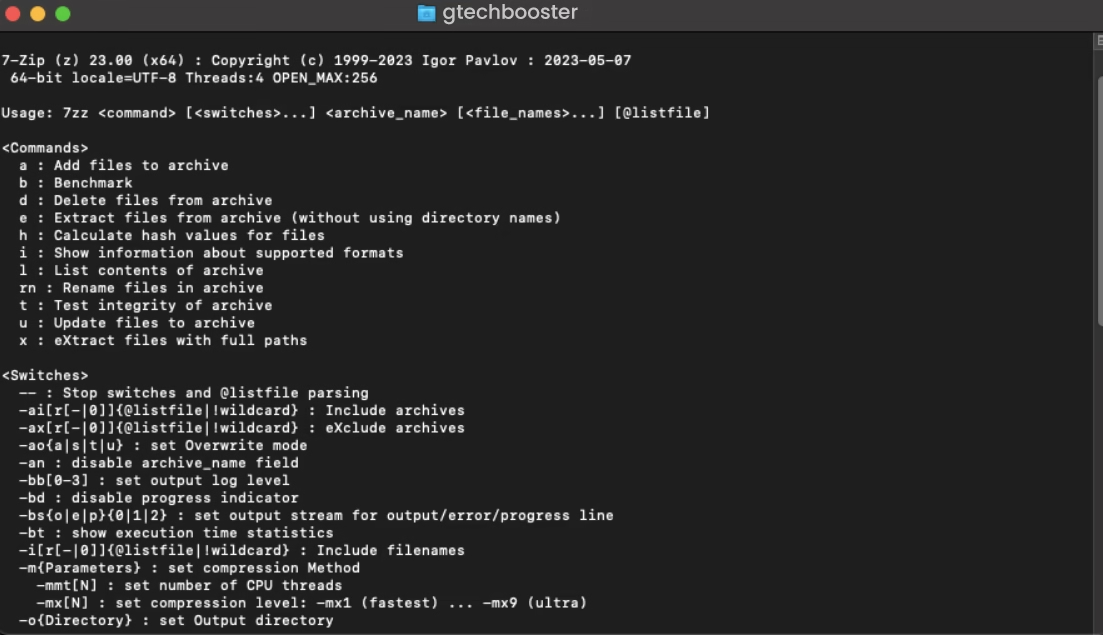
7-Zip supports both 32- and 64-bit architectures and offers a graphical user interface (GUI) for Windows alongside a command-line interface (CLI) that supports cross-platform usage, including Linux. The software integrates smoothly with the Windows shell, allowing users to compress or extract files directly through context menu options. It offers encryption via 256-bit AES, a robust security feature that can encrypt both the contents and metadata of archives for enhanced privacy.
Compression and Supported Formats
The 7z format underlying 7-Zip supports advanced compression algorithms like LZMA and LZMA2, which enable significantly better compression ratios compared to older formats. 7-Zip can compress large data sets efficiently (theoretically up to 16 exabytes) and supports creating multi-volume archives, creating self-extracting archives, and handling corrupted filenames by renaming files as needed during extraction. Besides 7z, it can read and write several other popular formats including ZIP, GZIP, BZIP2, TAR, and RAR among others. 7-Zip supports compressing into about 7 main formats and decompressing from more than 30 formats.
7-Zip supports a wide range of archive formats for compression (packing) and decompression (unpacking). Specifically:
Compression and decompression: 7z, XZ, BZIP2, GZIP, TAR, ZIP, WIM
7-Zip
Decompression only: APFS, AR, ARJ, CAB, CHM, CPIO, CramFS, DEB, DMG, FAT, FLV, HFS, ISO, LZH, LZMA, MSLZ, MSI, NSIS, NTFS, Office Open XML formats (DOCX, PPTX, XLSX), Onepkg, PPMd, RAR (including RAR5), RPM, SquashFS, SWF, UDF, VHD, VMDK, XAR, Z, and others
7-Zip can handle many formats used in both file archives and disk images, supporting over 30 different formats in total for reading and writing, with some formats only supported for extraction.
Usage and Practical Applications
7-Zip is valued for its user-friendliness and flexibility. Users can compress files by right-clicking and selecting 7-Zip from the context menu, choosing compression level and format. Its ability to unpack executable installer files without launching them simplifies software installation management. 7-Zip is available in many languages, free for personal and commercial use, and is regularly updated by its developer community, making it a reliable choice for both individual users and businesses requiring efficient file storage and transfer solutions.
Security Considerations
While its strong encryption capabilities make 7-Zip secure for personal data storage, the same features can be exploited maliciously. The ability to encrypt file contents and metadata without detection by traditional antivirus tools means users should exercise caution when handling 7z files from untrusted sources.
In a shell, 7-Zip is an advanced, open-source compression tool offering powerful compression, wide format support, strong encryption, and versatile usability across platforms, making it an indispensable utility for managing file archives efficiently and securely.
More Information ℹ















Conversation
Login to comment.
Log In / Register