Upload and Download – What They Actually Mean and How They Work
Despite how familiar the terms are, most people have only a surface-level understanding of what is actually happening when data moves in each direction, why one direction is usually faster than the other, and why the distinction actually matters in practice.
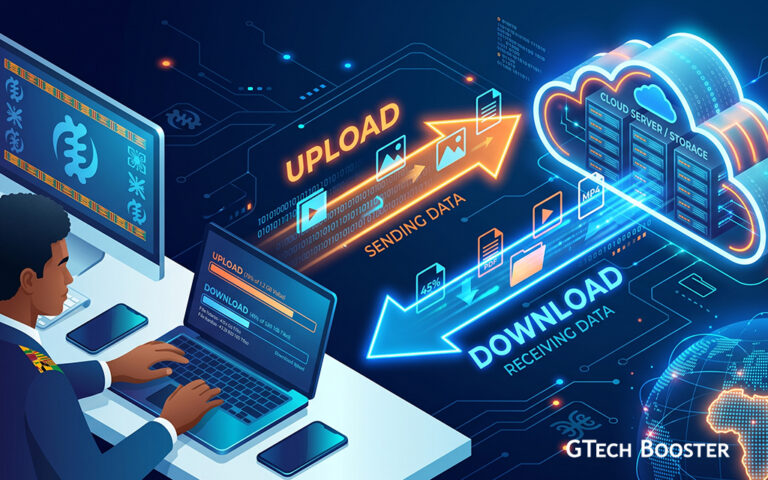
Upload and download are two of the most commonly used words in everyday computing, appearing on every internet plan advertisement, every speed test result, and every file transfer dialog box. Despite how familiar the terms are, most people have only a surface-level understanding of what is actually happening when data moves in each direction, why one direction is usually faster than the other, and why the distinction actually matters in practice. This article explains both terms in detail, the technical mechanics behind them, and why the asymmetry between them shapes so much of how the modern internet is built and priced.
The Basic Definitions
Downloadnoun
1refers to the transfer of data from a remote source, such as a website’s server, a cloud storage service, or another computer, to your own device. Every time a webpage loads, a video streams, a song plays, or a file gets saved from the internet onto your computer or phone, that is a download in progress. The data is moving toward you.
Eg. You download of this page via your browser was a few milliseconds.
Uploadnoun
1Upload refers to the transfer of data in the opposite direction, from your own device out to a remote server or another computer. Sending an email with an attachment, posting a photo to social media, backing up files to cloud storage, or speaking during a video call are all examples of uploading. The data is moving away from you, out into the network.
Eg. You upload of that file at you last application form filling was a breeze.
The easiest way to keep the two straight is to think of your own device as the reference point. Data coming down toward you is a download. Data going up and out from you is an upload. The directional language, up and down, is a metaphor rather than a literal description of how data physically travels, but it has stuck because it maps intuitively onto how people already think about receiving something versus sending something.
What Is Actually Happening Technically
Underneath these simple definitions sits a fairly consistent technical process, regardless of which direction the data is moving.
Breaking data into packets
Data traveling across the internet, in either direction, is broken down into small units called packets before it ever leaves a device. Rather than sending an entire file or webpage as one continuous stream, the sending device chops the data into these smaller packets, each one labeled with information about where it came from, where it needs to go, and where it fits within the larger sequence of data being transferred. This packet-based approach is fundamental to how the internet functions, allowing many different transfers, from many different devices, to share the same underlying network infrastructure efficiently rather than requiring a dedicated, exclusive connection for every single transfer taking place at once.
Routing across the network
Once broken into packets, the data travels across a chain of intermediate network equipment, routers, switches, and various internet service provider infrastructure, each piece of equipment reading the addressing information on each packet and forwarding it toward its next hop on the way to its final destination. Individual packets belonging to the same transfer do not necessarily all take the exact same physical path across the network, but they are reassembled in the correct order once they arrive at their destination, using the sequencing information embedded in each packet.
The protocols governing the transfer
Most everyday downloads and uploads rely on a small number of standardized protocols that define exactly how this packet exchange should happen. The Transmission Control Protocol, or TCP, is the most common underlying transport protocol for reliable transfers, handling the reassembly of packets in the correct order and requesting retransmission of any packets that get lost or corrupted along the way. Sitting on top of TCP, protocols like HTTP and HTTPS, the same protocols your web browser uses to load websites, define how a device requests data from a server, in the case of a download, or sends data to a server, in the case of an upload, along with how that data should be formatted and interpreted once it arrives.
The client-server relationship
Most everyday downloads and uploads follow what is called a client-server model. Your device, the client, initiates a request. For a download, that request asks a server to send data back to you, such as a request for a webpage or a video file. For an upload, your device instead sends data outward to the server, such as submitting a form, backing up a photo, or posting content to a social platform. The server, a remote computer typically operated by the website, cloud service, or platform you are interacting with, handles the other end of that exchange, either fulfilling the download request by sending data or accepting and storing the data being uploaded.
Why Download Speeds Are Usually Faster Than Upload Speeds
One of the most noticeable practical realities of internet service is that download speeds are typically advertised, and typically experienced, as meaningfully faster than upload speeds on the same connection. This is not an accident or a technical limitation nobody has bothered to fix, it is a deliberate design choice rooted in how most people actually use the internet.
Asymmetric connections by design
Most residential internet connections, particularly older cable and DSL technologies, and even many fiber offerings, are intentionally built as asymmetric connections, meaning they allocate significantly more available bandwidth to downloading than to uploading. This design choice reflects historical and continuing patterns of typical internet usage: the overwhelming majority of everyday consumer activity, loading webpages, streaming video, downloading files, and browsing social media, involves pulling far more data down from the internet than pushing data back up to it. Internet service providers have historically optimized their network capacity allocation around this reality, dedicating the bulk of available bandwidth to the download direction where the actual demand has traditionally been concentrated.
Shifting usage patterns are changing the picture
This traditional asymmetry has become somewhat less absolute in recent years, as usage patterns have shifted. Video calls, live streaming, cloud-based file backup, and remote work in general all require substantially more upload capacity than older, more passive browsing and streaming-only usage patterns did. This is precisely why symmetric connections, offering equal download and upload speeds, have become an increasingly common selling point specifically for newer fiber internet offerings, marketed directly at customers whose usage now genuinely depends on strong upload performance rather than treating upload as a secondary afterthought.
How Speed Is Actually Measured
Both download and upload speeds are measured in bits per second, most commonly expressed using larger units like megabits per second, abbreviated Mbps, or gigabits per second, abbreviated Gbps. This measurement describes throughput, the volume of data capable of moving across the connection within a given span of time, rather than describing any fixed total amount of data.
A detail that trips up a genuinely large number of people is the difference between bits and bytes. Internet speeds are conventionally advertised in megabits per second, using a lowercase b, while file sizes are conventionally displayed in megabytes, using an uppercase B, and there are eight bits in a byte. This means a connection advertised at 100 Mbps is not capable of downloading 100 megabytes of data per second, it is capable of downloading roughly 12.5 megabytes per second, since the raw bit-based speed figure needs to be divided by eight to arrive at the more familiar byte-based figure used to describe file sizes. This single unit conversion is responsible for an enormous amount of everyday confusion about why a download seems to be taking longer than a customer’s advertised internet speed would seem to suggest it should.
Factors That Affect Real-World Speed
The maximum speed advertised by an internet service provider represents a theoretical ceiling under ideal conditions, and real-world performance is shaped by several additional factors layered on top of that baseline.
- Network congestion. Because internet infrastructure is shared among many users at once, both within your own household and across your broader neighborhood or service area, heavy simultaneous usage by others sharing the same infrastructure can noticeably reduce the actual speed any individual connection experiences at a given moment.
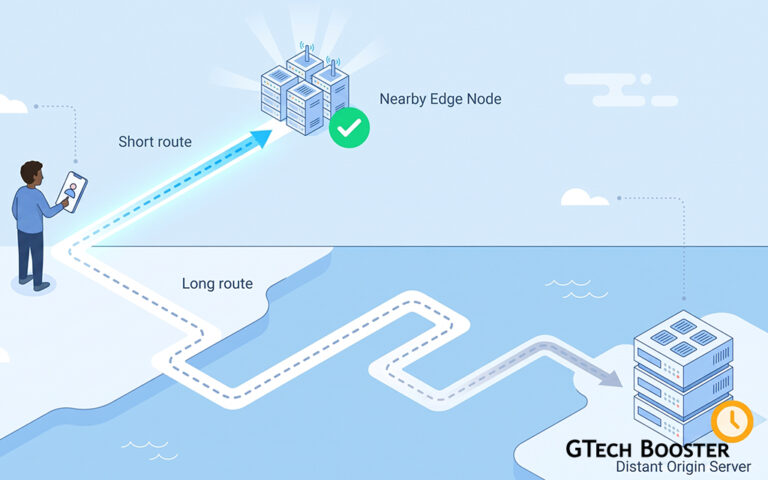
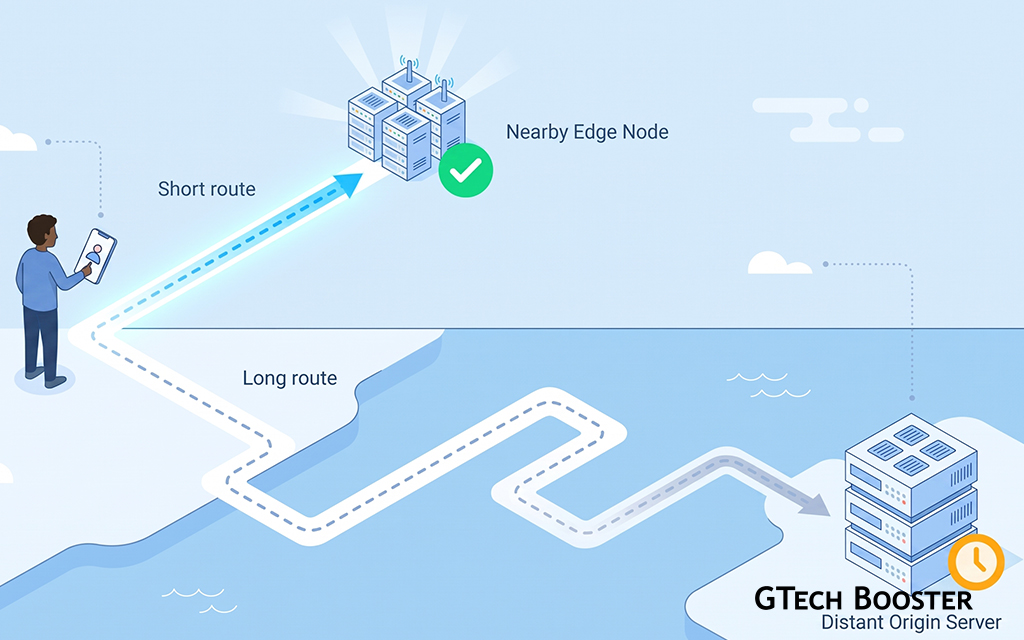
- Distance to the server. Data traveling to or from a server located physically far away generally experiences higher latency and can experience reduced effective throughput compared to a server located closer to you, an effect content delivery networks are specifically designed to reduce by caching content at locations physically closer to end users.
- Wi-Fi versus wired connections. A wired ethernet connection generally delivers more consistent, and often faster, real-world speeds than a Wi-Fi connection to the same network, since wireless signals are more susceptible to interference, distance-related signal degradation, and interference from other nearby wireless devices and networks.
- Device and router hardware limitations. Older networking hardware, whether a router, modem, or the network adapter inside a specific device, may simply be technically incapable of reaching the full speed a broader internet connection is otherwise capable of delivering, creating a bottleneck at that specific piece of equipment rather than anywhere else along the path.
- The server’s own upload capacity. A download’s real-world speed is also fundamentally limited by how quickly the remote server itself, and the connection it is using, is able to upload the requested data outward, meaning a slow or heavily loaded server can bottleneck a download even over an otherwise fast, uncongested local connection.
Why the Distinction Genuinely Matters in Practice
Understanding the practical difference between upload and download needs is not merely a technical curiosity, it has real, direct consequences for choosing an internet plan and troubleshooting problems correctly.
Someone whose primary internet usage is streaming video, browsing the web, and downloading occasional files has relatively modest upload requirements and can generally be well served by a connection with strong download speeds even if its upload speed is comparatively modest. Someone who regularly participates in video calls, live streams content, uploads large files to cloud storage, or hosts any kind of server-side service from their home connection has meaningfully different requirements, and a connection with weak upload speeds specifically can create real, frustrating problems, choppy video calls, slow cloud backups, and stuttering live streams, even if that same connection’s download speed looks perfectly strong on paper.
This distinction also matters directly for diagnosing connectivity problems. A webpage loading slowly points toward a download-side issue, whether congestion, server distance, or a local bottleneck. A video call where your own audio and video keep freezing for the other participants, while you can see and hear them perfectly fine, points specifically toward an upload-side problem on your own connection, since your outgoing data is what the other participants are actually receiving, even though the symptom shows up during what feels, from your perspective, like a two-way conversation rather than a one-directional transfer.
Wrapping Up
Upload and download describe something conceptually simple, the direction data is moving relative to your own device, but that simple distinction sits on top of a genuinely intricate technical process involving packet-based data transfer, routing across shared network infrastructure, and standardized protocols governing how devices request and exchange information with servers. The persistent asymmetry between typical download and upload speeds reflects deliberate historical design choices rather than an unavoidable technical limitation, choices that are actively being reconsidered as usage patterns shift toward more upload-intensive activities like video calling and cloud backup. Understanding both halves of this picture, not just the download speed prominently advertised on a monthly internet bill, gives a far more complete and genuinely useful picture of what a given internet connection can actually deliver for the specific way any individual person or household actually uses it.
More Information ℹ









Conversation
Login to comment.
Log In / Register