
GhanaPostGPS version 2 brings new features
Version 2 of GhanaPostGPS introduces an updated user interface and enhanced performance for generating digital addresses across Ghana.

GhanaPostGPS is Ghana’s official digital addressing system, providing unique codes for every location in the country. It combines postcodes with specific identifiers to enable precise navigation and service delivery. The system is accessible via a website and mobile apps on iOS and Android.

GhanaPostGPS which started off as AsaaseGPS via the then Vokacom now Afrifanom have come a long way in helping Ghana with national realisation of a digital addressing system. As with all innovation the mapping and addressing system has come a long way since 2017 and continues to forge path to better itself and serve its purpose and even better for why it was made.
Key Features
- Every 5m x 5m location receives a digital address made from region, district, area codes, and a unique identifier.
- The app converts GPS coordinates into these user-friendly addresses and integrates with Google Maps for navigation, showing roads and landmarks.
- Users can share addresses easily for deliveries, emergencies, or visits.
- In the version two (2) the primary map is Open street Maps with an ability to port into Google Map for users when they need or want to.
Availability and Use
Download the free GhanaPostGPS app from the App Store or Google Play, or visit ghanapostgps.com to find your address. It’s required for Ghana Card registration and KYC processes like banking. While useful officially, some prefer Google Maps pins for daily navigation. GhanaPostGPS is not yet available for the HarmonyOs platform.
Benefits
The system improves logistics, emergency response, and e-commerce by replacing vague directions with exact codes. It works offline in low-connectivity areas and supports discovering nearby points of interest. Government-backed since 2017, it covers all of Ghana comprehensively.
How to register an account on GhanaPostGPS
Registering an account on GhanaPostGPS is a straightforward process done primarily through their mobile app. Download the app first from the Google Play Store or Apple App Store, then follow the on-screen prompts to create your profile.
Step-by-Step Guide
Launch the GhanaPostGPS app and accept the terms and conditions. Enter your phone number to receive a 4-digit verification code, then input it to proceed.
Provide personal details like first name, last name, gender, and date of birth. Enable location services (turn on GPS), allow permissions for location and other features, and wait for your digital address to generate based on your current position—be outdoors for accuracy and wait 5-20 seconds to confirm.

You can skip registration for one-time use, but full account setup is needed for saving addresses or advanced features. Windows users access via ghanapostgps.com, though app registration is recommended. The process integrates with Ghana Card and other services.
What differs version 1 from version 2
GhanaPostGPS version 1 and version 2 (or older vs. newer updates) differ mainly in user interface, functionality, and reliability based on app reviews. Older versions (v1 equivalents) used Google Maps integration with satellite view, better search, and clickable saved addresses, while newer versions (v2) feature a redesigned UI but removed key features.
Key Differences
Mapping and Navigation
Version 1 offered Google Maps with satellite mode and place search; version 2 switches to a poorer custom map without satellite view or search, making it harder to generate addresses for non-current locations.
Saved Addresses
Older versions allowed easy access and clicking on saved spots; newer ones delete saves on update and crash when accessing them.
Performance
Version 1 was more stable for multitasking; version 2 crashes frequently, lacks print options, and limits address generation to current GPS position only. A good shed off for growth.
Version 1 in View
Version 2 in View
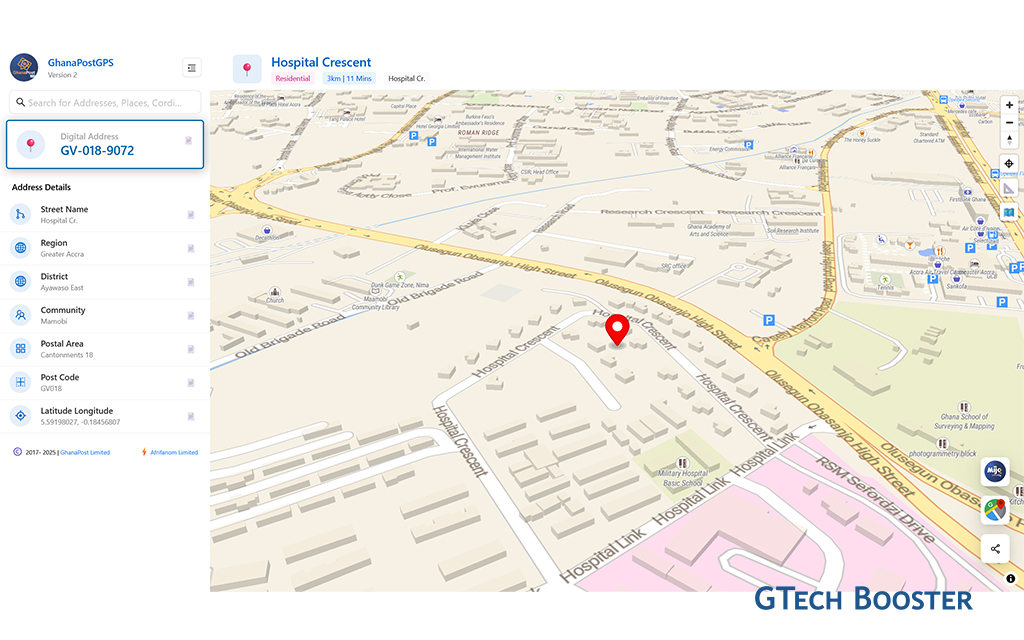
User Feedback
Many users prefer reverting to version 1 due to degraded UX in version 2, like oversized markers and no multi-region support. Developers added speed and language options in upgrades around 2019, but recent changes prioritize aesthetics along usability resulting in improved results.
Now from the web version, GhanaPost Mijo is accessible for commuters looking to make use for their transportation needs.
More Information ℹ


Gabby















Be polite and constructive with your point.